ESP32-C3 / CYX DC05V RELAY
Connect the release pair.
This wiring follows your clarification: joining two existing release wires unlocks the door. The relay acts as a momentary dry-contact switch; it does not power the lock.
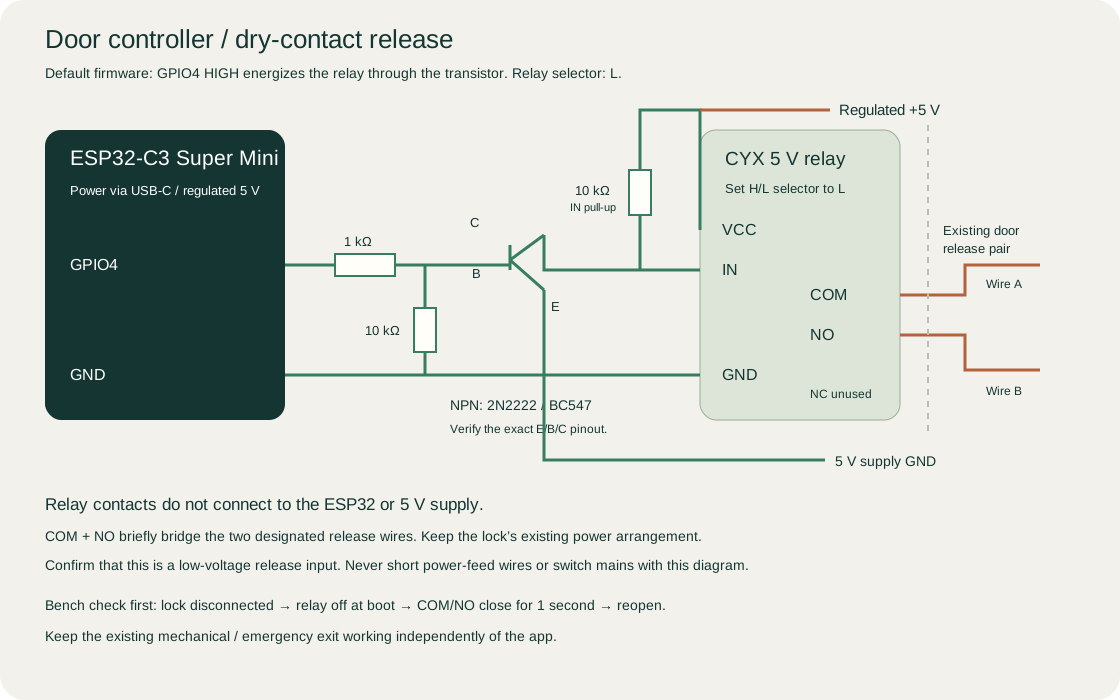
Control wiring
- Power the ESP32-C3 through USB-C from a regulated 5 V supply. Power relay VCC from 5 V; join relay GND, ESP32 GND and the control supply GND.
- Set the relay board’s H/L selector to L.
- GPIO4 → 1 kΩ resistor → transistor base (B). Transistor emitter (E) → GND. Collector (C) → relay IN.
- Add 10 kΩ from base to GND, and 10 kΩ from relay IN to +5 V. These keep the transistor and relay off during boot.
- Check the actual transistor’s E/B/C pinout. The firmware uses RELAY_ACTIVE_HIGH=1 for this interface.
The ESP32 GPIO never connects directly to a 5 V input. Do not connect a 5 V relay coil directly to GPIO.
Door release
- Disconnect the lock release wires while testing.
- Use a meter to verify COM/NO are open at power-up.
- After setup, confirm a request closes COM/NO for one second and opens them again.
- Only then connect one designated release wire to COM and the other to NO. Leave NC unused.
No extra 3.3 V or 5 V goes into this release pair. Identify wires by their existing release function, not by color. Preserve the lock’s existing supply, mechanical exit and emergency release.
Confirm the release input is low voltage and within the relay’s DC contact rating. This is a DIY controller and has not been hardware-tested or certified for life-safety use.
Install firmware with Arduino IDE
Download Arduino IDE firmware ZIP ↓ · Step-by-step Arduino IDE guide ↗
Extract the ZIP, open RitikDoorController.ino and copy this door’s private device_config.h beside it. Select ESP32C3 Dev Module, enable USB CDC On Boot and follow the guide’s board/library versions before Upload. Each controller needs its own downloaded configuration.
PlatformIO alternative
Download firmware source ZIP ↓. Install PlatformIO on a desktop, download your private device_config.h from Controller setup in the app and place it in the firmware’s include folder. Open that firmware folder in PlatformIO and build/upload for ESP32-C3. On Windows, use a short source/toolchain path if the compiler hits its command-line limit.
For Android use the app’s Bluetooth setup button in Chrome or Edge. For iPhone first use, join the open controller Wi-Fi and visit http://192.168.4.1 in Safari. Manufacturers flash boards before sale and supply the matching private setup card. Customers use Set up your lock to connect Wi-Fi and create their admin account. Later Wi-Fi setup requires holding BOOT and the device setup password. Keep the downloaded device configuration private.